Onesoft 100VR education cloud platform is an online education cloud platform specially developed for various schools,training institutions, and scientific organizations,etc by Xiamen Phoenix Onesoft Co.,Ltd with its unique and international leading online VR 3D interactive technology, 3D interactive educational teaching resources, and cloud service technology. Its network VR experiment 3D interactive environment is driven by Onesoft VR 3D interactive engine. It also supports a lot of users to rapidly download, build, and render dynamic 3D interactive scenes at the same time.
At present,Onesoft education platform adopts VR technology to make various physical components,instruments,training equipment, and 3D interactive VR experimental scenes. Users,according to requirements of experiment,can independently operate the components,instruments,and training equipment,etc which will interactively response according to their physical attributes, achieving the purpose that users will immerse themselves in the scenes to do the vivid VR experiments. Users can also rotate the models of 3D experimental equipment or components in any direction and change the viewpoint, so that each component can be viewed in 360°to achieve the intuitive,3D and interactive effect. Meanwhile, the platform can also demonstrate 3D animations and automatically and synchronously display the relative texts of principles and explain them in voice to make it easy for users to deeply comprehend experiment contents and principles.
The education platform has the characteristics of openness,expansibility,compatibility,and perspectiveness, can efficiently manage experimental teaching resources,provide comprehensive search and navigation service, and immediately release application message of resources. Through the “One-stop” application and with “Cloud” idea, the service covers more than 500 courses including basic education,vocational education, higher education,and remote education, more than 3 million 3D models,and online teaching resources of more than 100 teachers, so all users will have an available and equal platform,making the teaching really informationalized.
Onesoft education cloud platform provides the following services for users:
Cloud Host: Cloud host sorts out the physical resources through the VR technology, provides the VR host services for users, helps simplify the development of server and the deployment of work, and quickly create the teaching and research environment suitable for school.
Cloud Storage: Cloud storage provides the users with the services of storing files,pictures,audios,videos, 3D models,and other digital teaching resources.
Cloud Application: Cloud application provides the users with excellent teaching resources and education informatization services.
Onesoft education cloud platform includes the following digital teaching resources:
Onesoft education cloud platform not only contains millions of traditional multimedia (picture,flash,video,PPT,etc.)coursewares, but also consists of more than 3 million 3D interactive model animations and 3D interactive visual teaching resources including lesson,VR lab,and evaluation,etc.
Onesoft education cloud platform not only owns a large amount of teaching resources, but also includes more than 40 courses and more than 500 3D interactive VR training and digital excellent courses.
Onesoft education cloud platform provides a full set of experimental teaching management system, including:
System management,teaching management,teaching resources management,experimental management,score management,and learning process management,etc.
Onesoft education cloud platform can provide teachers with the following functions:
Teachers can add,delete,or modify all the VR experimental teaching resources on the platform, upload and download coursewares,exercises and question banks, and customize the VR experimental projects. They can also develop the VR experimental contents with independent innovation and proprietary intellectual property rights and convert the scientific research results through Onesoft Web3D visual editor software and VR technology.
Onesoft education cloud platform provides the students with the following functions:
Students not only can learn the 3D interactive visual,intuitive, and vivid principles on the Onesoft education cloud platform,but also can do the physical and vivid 3D interactive VR experiments by themselves. The platform can intelligently guide and response to the 3D interactive VR experiment and make man-machine interactive prompt (including subtitle,voice, and animation)for the functions,specifications,performance indexes or work principles of components operated, as well as the actions,experimental scenes, and simulation documents,etc.
Onesoft education cloud platform also includes the following functions:
The platform can automatically time and grade the VR experimental process and result,enables to edit the experimental contents, and provides teachers with real-time help in editing experimental solutions. Teachers not only can edit the texts or prompts for steps and work principles of VR experiment,but also can edit the contents for equipment and parts as well as the prompts during disassembling and assembling equipment and parts, and can set the faults and troubleshooting steps. It makes it possible to reform experimental teaching methods, such as independent study, inquiry learning, and cooperative learning, improves teachers’ teaching ability, enriches teaching contents,explores practical areas,reduces cost and risks, and prompts the green experimental teaching.
Onesoft education platform is the infrastructure of educational informationization in the future and includes the hardware and software resources that are necessary for educational informationization. After the virtualization of these resources,a comprehensive teaching platform is provided for the educational institutions, educators and learners.
Onesoft education cloud platform establishes various excellent teaching resources, so that every teacher and student can enjoy the resources and the gaps of teaching resources among regions,between urban and rural areas, and among schools will be narrowed. Therefore, the platform not only improves the teaching effects, but also integrally improves the regional education level.
Onesoft education cloud platform not only realizes the resources integration and sharing by data interconnectivity and information island elimination,but also can flexibly cope with the development of demands in the future by rapidly develop and establish a variety of teaching resources on the platform, and can also ensure the organic unity and integrated innovation of these resources to maximize the benefits.
Onesoft education cloud platform can provide the VR experimental environment for the scientific researches or course experiments,reduce times and materials cost of real experiments, increase the reliability of real experiment, and realize the purpose that teaching experiment will not be limited by laboratory space and teaching time and let students really experience the advantages of 24h online opening laboratory.
Onesoft education cloud platform is an opening and comprehensive platform with rich teaching resources. It seamlessly integrates various 3D interactive VR experiments to provide schools with the solution of integration of multiple courses. It is especially suitable for making online courses to realize the application of online teaching and e-learning.
| *Problem Description: | |
| *Email: | Prompt:Please use the effective email to receive our reply. |
| Submit |
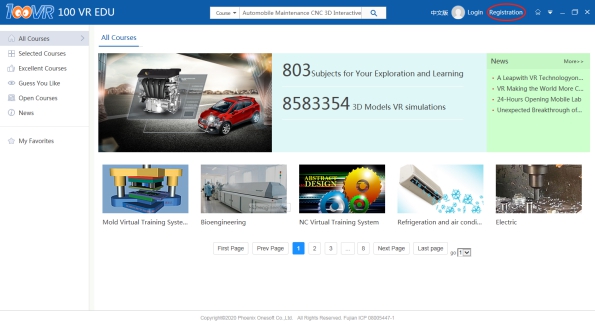
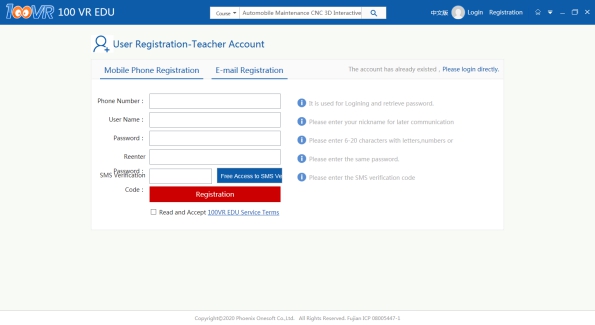
There is a navigation menu on the upper right corner of homepage. Click “Register” to enter the registration page and fill the relevant information to register as new user. Or you can click the following link to enter the registration page.
Education Cloud Platform Address:http://www.100vr.com/100vr
Platform Registration Page:http://www.100vr.com/100vr/register
Education Cloud Platform Homepage: Click”Register’ on the upper right corner and enter the registration page.
How to login
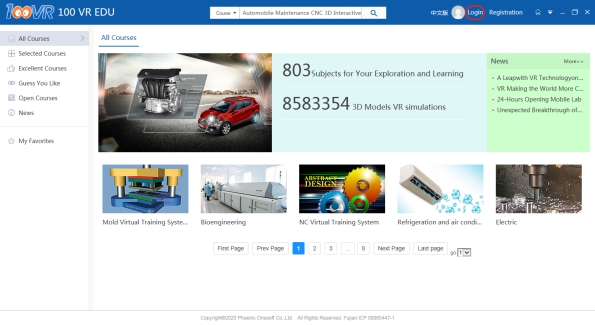
There is a navigation menu on the upper right corner of homepage.Click login and enter the user name and password to log in.
Education Cloud Platform Homepage: Click “login” on the upper right corner and enter the login page.
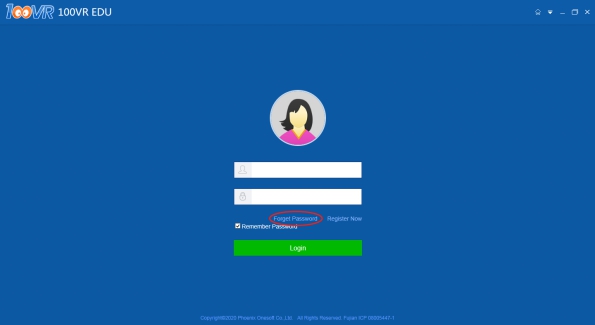
Login Page: Enter the login page, key in the user name and password, and click login.
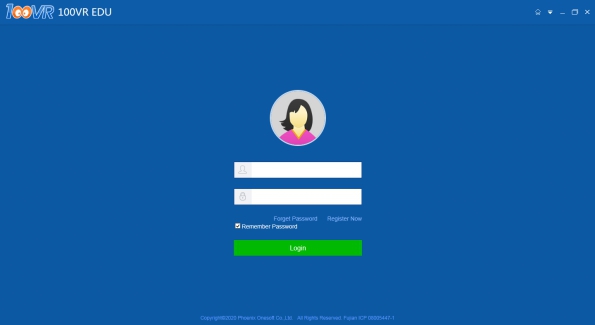
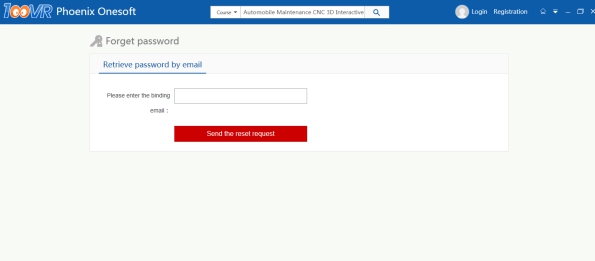
Enter the login page of 100VR EDU Cloud platform.There is an option”Forget Password” above the “Login” button.Click “Forget Password” and enter the password retrieving page, and enter the email or phone number used during registration to retrieve the password.
Login Password: Enter the login page, click “Forget Password”, and enter the password retrieving page.
Password retrieving page: Enter the email or phone number used during registration.After confirmation,the system will automatically send the email or text message to the corresponding account.
Current Version: V2.3